The Ultimate Beginner’s Guide to Mechanical Keyboards: From Clicks to Thoccs
Are you tired of the mushy, flat keys on your laptop or standard office keyboard? You aren’t alone. Welcome to the world of mechanical keyboards—a hobby that blends aesthetics, acoustics, and tactile satisfaction.
Whether you are a competitive gamer looking for "Rapid Trigger" technology or a writer chasing that perfect, deep "thocc" sound, this guide will demystify the terminology and help you build or buy your perfect board.
1. The Anatomy: What’s Inside the Sandwich?
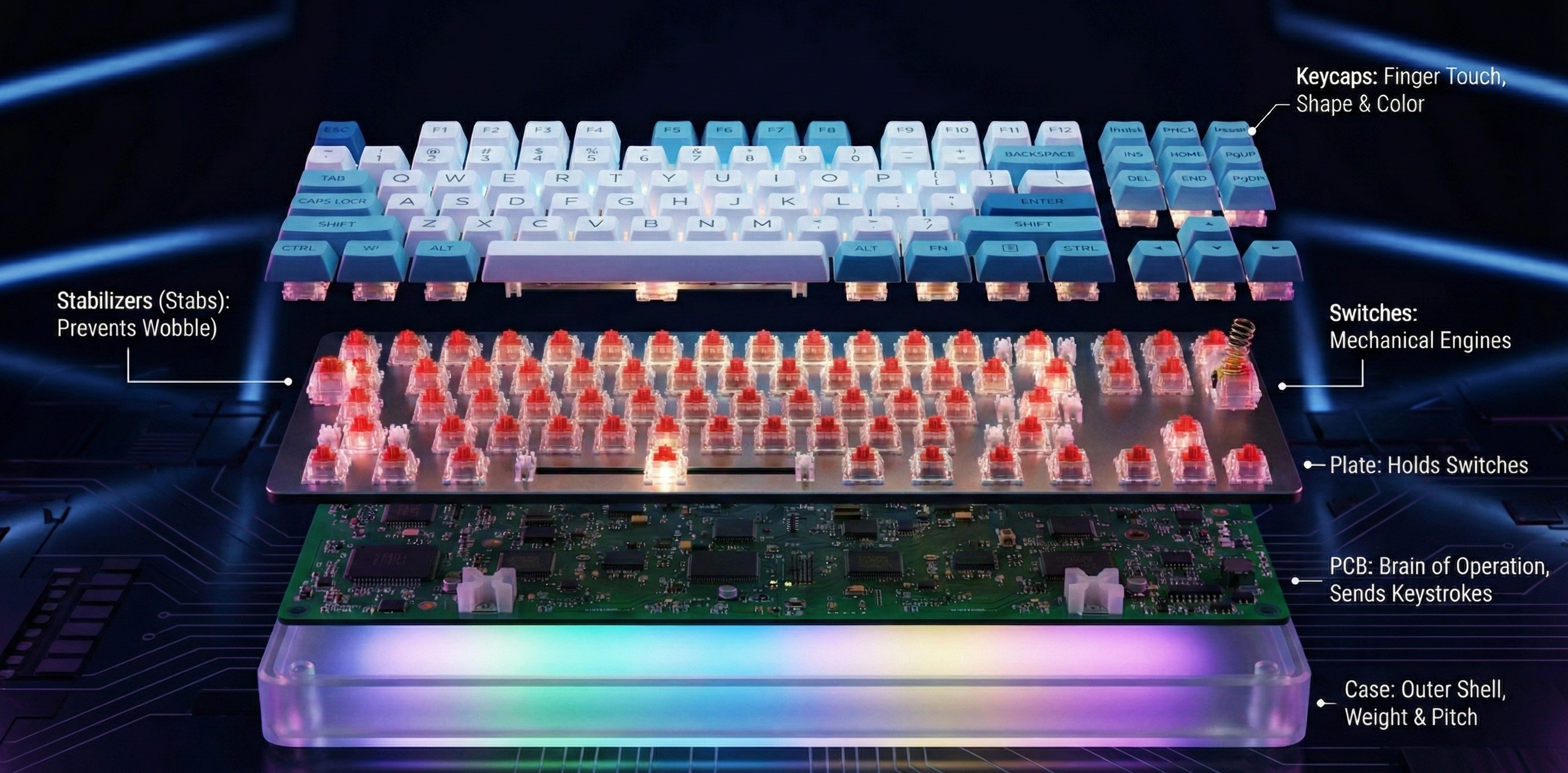
A mechanical keyboard isn't just a single piece of plastic; it is a stack of components working together. Think of it as a sandwich, where every layer changes the flavor (or in this case, the sound and feel).
- Case: The outer shell. It defines the weight and pitch. Plastic is lighter and cheaper; Aluminum is heavy and premium; Acrylic allows RGB light to shine through the body.
- PCB (Printed Circuit Board): The brain of the operation. This green board hides under the switches and sends your keystrokes to the computer.
- Plate: A sheet (metal or plastic) that sits on top of the PCB to hold the switches in place.
- Switches: The mechanical engines under the keys. This is what you actually press down.
- Stabilizers ("Stabs"): Essential mechanisms that keep long keys (Spacebar, Enter, Shift) from wobbling or tilting like a seesaw.
- Keycaps: The plastic covers your fingers touch. They come in various shapes and colors.
2. Choosing Your Size (Form Factors)
Keyboards are measured in percentages relative to a "Full-sized" board. Finding the right size is a balance between utility and desk space.
| Size | Description | Best For |
|---|---|---|
| 100% (Full-size) | Contains everything: Numpad, F-row, and Arrow keys. | Data entry, accountants, and office traditionalists. |
| 80% (TKL) | "Tenkeyless." Standard layout but cuts off the Numpad. | Most gamers who need mouse space but want arrows. |
| 75% | The modern favorite. Packs F-keys and Arrows into a tight cluster. | Enthusiasts who want functionality in a small footprint. |
| 65% | Removes the Function row (F1-F12) but keeps Arrow keys. | Writers and travelers who need portability. |
| 60% | The minimalist. No arrows, no F-row, no Numpad. | FPS Gamers and code minimalists. |
Analogy: Choosing a size is like picking a vehicle.
- Full-size: A Minivan. Holds everything, very practical, but hard to park (takes up desk space).
- 60%: A Sports Coupe. Fast, looks amazing, but you have no trunk space (you have to use key combinations/layers to access arrows).
3. The Switch: The Soul of the Keyboard
When people talk about "feel," they are talking about switches. They are generally categorized by the color of the stem (the moving part) and their behavior.
The Big Three Types
- Linear (Red/Yellow/Black): Smooth travel straight down. No bump, no click.
- Why use it? Gamers love them for speed and consistency.
- Tactile (Brown/Clear/Holy Panda): Has a physical "bump" halfway down the press. You feel exactly when the key registers.
- Why use it? Typists love the feedback; it prevents "bottoming out" (slamming the key down).
- Clicky (Blue/Green): Has a tactile bump and an audible "click" mechanism.
- Why use it? If you want to sound like a typewriter (warning: your roommates might hate you).
The New Tech: Magnetic & Optical
- Optical Switches: Break a beam of light to register a press. Faster than standard mechanical contacts.
- Hall Effect (HE) / Magnetic: These use magnets to detect key depth. They enable Rapid Trigger, a feature where the key resets the instant you lift your finger (even 0.1mm). This is currently the "meta" for competitive games like Valorant and Counter-Strike.
4. PCB Types: Hot-Swap is King
If you are a beginner, there is only one term you need to look for: Hot-swappable.
- Hot-Swap PCB: You can pull switches out and push new ones in like LEGO bricks. No tools required. This allows you to try Linear switches one month and Tactile the next.
- Soldered PCB: The switches are melted onto the board with metal solder. To change them, you must melt the metal and remove it.
Tip: Avoid "Soldered" boards for your first purchase unless you are already comfortable with electronics repair.
5. Mounting & Materials: Chasing the "Thocc"
Why do some keyboards sound thin and clacky while others sound deep and marble-like (Thocky)? It depends on the materials and how they are mounted.
Plate Materials
- Stiff (Brass/Steel/Aluminum): Higher pitched sound, very firm feeling when you type.
- Flexible (Polycarbonate/POM/FR4): Deeper sound, softer feeling. Good for "Thocc."
Mounting Styles
- Tray Mount: The PCB screws directly into the bottom case. Common in cheap boards. Can feel uneven.
- Gasket Mount: The current gold standard. The plate is sandwiched between rubber or foam strips (gaskets). It "floats" inside the case, isolating vibrations. This creates a bouncy, soft typing feel and cleaner sound.
6. Keycaps: ABS vs. PBT
Don't overlook the plastic you touch all day.
- ABS (Acrylonitrile Butadiene Styrene):
- Pros: Colors are often brighter; usually cheaper.
- Cons: Develops a greasy "shine" quickly; sounds higher-pitched.
- PBT (Polybutylene Terephthalate):
- Pros: Textured, sandy feel; very durable; does not shine; deeper sound.
- Cons: Can be more expensive.
Look for "Double-Shot": This refers to how the letters (legends) are made. Double-shot means the letter is a separate piece of plastic molded into the keycap. The letter will never fade away, no matter how much you type.
7. Enthusiast Terminology & Mods
Once you have your board, you might want to "mod" (modify) it to make it better.
- Lubing: Taking a switch apart and painting the insides with oil/grease (like Krytox 205g0).
- Benefit: Removes scratchiness and deepens the sound.
- Stabilizer Tuning: Adding lube to the stabilizers to stop the Spacebar from rattling or ticking.
- Tape Mod: Putting painters tape on the back of the PCB. Surprisingly, this filters out high-pitched frequencies and makes the board sound "creamy."
- NKRO (N-Key Rollover): A feature that ensures if you press 10 keys at once, all 10 are registered. Essential for gaming.
Comparison Summary
| Feature | Beginner/Budget Choice | Enthusiast/Premium Choice | |
|---|---|---|---|
| Connection | Wired (USB-C) | Tri-Mode (Wired + Bluetooth + 2.4Ghz) | |
| Switch Type | Standard Red/Blue/Brown | Hand-lubed Linears or Magnetic (HE) | |
| Mounting | Tray Mount | Gasket Mount | |
| Software | Basic Driver | QMK/VIA (Open source, fully programmable) |